Overview
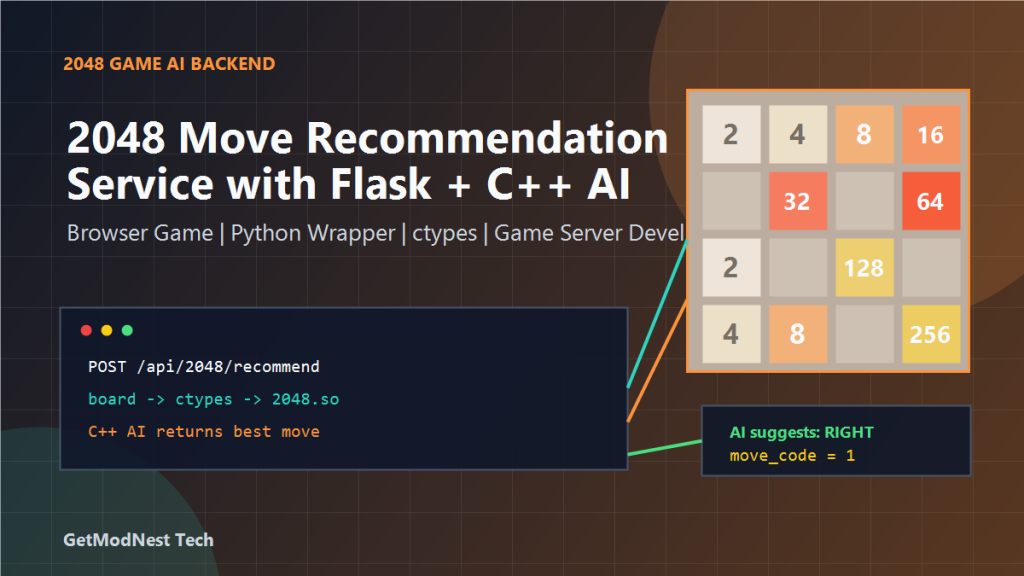
This article documents a practical workflow for 2048 AI Assistant for Move Recommendations. The goal is to let a browser-based 2048 game send the current board state to a server and receive the AI-recommended next move.
The recorded example uses a high-performance C++ 2048 decision algorithm, compiles it into a Linux shared library, loads it from Python with ctypes, and exposes the recommendation through a Flask API.
2048 web game -> board state -> Flask API -> Python wrapper -> C++ AI engine -> best move -> game frontendThis pattern is useful for browser games, puzzle game AI, autoplay demos, strategy training tools, and lightweight game backend prototypes.
Game Scenario
The target game is 2048, a tile-merging puzzle game where the player moves tiles in four directions. Equal tiles merge into larger values, and the player tries to reach higher scores.
A 2048 AI service can support:
- AI hint button
- autoplay mode
- human vs AI comparison
- move quality evaluation
- strategy training mode
- AI benchmark endpoint
Instead of rewriting the AI in Python or JavaScript, an existing C++ engine can be reused as a fast backend decision module.
System Architecture
Frontend 2048 board
  -> sends current board through HTTP
  -> Flask receives and validates the request
  -> Python converts the board format
  -> ctypes calls the C++ shared library
  -> C++ searches for the best move
  -> Flask returns JSON response
-> frontend displays or applies the move- Frontend: game board, player input, AI suggestion display
- Flask: HTTP API and validation
- Python wrapper: board conversion and native library call
- C++ engine: high-performance 2048 AI search
Source Files
2048.cpp        core 2048 AI search and recommendation logic
2048.h          C++ function declarations
config.h        algorithm configuration
platdef.h       platform-specific definitions
ai_logic.py     Python wrapper for the C++ shared library
app.py          Flask backend API service
bin/2048.so     compiled Linux shared library
Recommended Project Structure
2048-ai-service/
  app.py
  ai_logic.py
  2048.cpp
  2048.h
  config.h
  platdef.h
  bin/
    2048.so
  static/
    2048.html
    2048.js
    style.css
The frontend can stay lightweight while the backend handles the AI recommendation logic.
Step 1: Install the Build Environment
sudo apt update
sudo apt install -y g++ build-essential
The g++ compiler builds the native 2048 AI module, and build-essential provides common build tools and headers.
Step 2: Compile the 2048 AI Engine
g++ -O3 -fPIC -shared 2048.cpp -o bin/2048.so-O3 optimize the AI search
-fPIC generate position independent code
-shared build a .so shared library
-o specify output fileThe output bin/2048.so becomes the native AI engine used by the Flask game backend.
Step 3: Expose C-Compatible Functions
When Python calls C++ through ctypes, exported names should be stable. Use extern "C" to avoid C++ name mangling.
extern "C" {
    void init_tables();
    int find_best_move(unsigned long long board);
}
init_tables() initialize lookup tables
find_best_move(board) receive encoded board and return recommended moveStep 4: Load the AI Engine in Python
import ctypes
import os

so_path = os.path.join(os.path.dirname(__file__), "bin", "2048.so")
ailib = ctypes.CDLL(so_path)

ailib.init_tables.restype = None
ailib.find_best_move.argtypes = [ctypes.c_uint64]
ailib.find_best_move.restype = ctypes.c_int

ailib.init_tables()
Using a path based on __file__ makes the shared library path stable when Flask is started from different working directories.
Step 5: Represent the 2048 Board
The frontend may send a 4×4 board array.
board = [
    [2, 0, 0, 2],
    [0, 4, 0, 0],
    [0, 0, 8, 0],
    [2, 0, 0, 0],
]
For debugging, the board can also be sent as a compact string.
2-0-0-2-0-4-0-0-0-0-8-0-2-0-0-0frontend board -> Python 4x4 list -> encoded 64-bit board -> C++ AI engineStep 6: Wrap the Move Recommendation
def recommend_move(board):
    c_board = to_c_board(board)
    move_code = ailib.find_best_move(c_board)
    return move_code
A useful direction mapping can be:
0 -> up
1 -> right
2 -> down
3 -> left
The mapping must match the C++ engine and frontend movement logic.
Step 7: Create the Flask API
POST /api/2048/recommendExample request:
{
  "board": [
    [2, 0, 0, 2],
    [0, 4, 0, 0],
    [0, 0, 8, 0],
    [2, 0, 0, 0]
  ]
}
Example route:
from flask import Flask, jsonify, request
from ai_logic import recommend_move

app = Flask(__name__)

MOVE_NAMES = {0: "up", 1: "right", 2: "down", 3: "left"}

@app.post("/api/2048/recommend")
def recommend_2048_move():
    payload = request.get_json(silent=True) or {}
    board = payload.get("board")

    if not is_valid_board(board):
        return jsonify({"error": "invalid board"}), 400

    move_code = recommend_move(board)
    return jsonify({
        "move": MOVE_NAMES.get(move_code, "unknown"),
        "move_code": move_code,
    })
Frontend Integration
The browser game can call the API when the player clicks an AI hint button.
player makes a move
  -> frontend updates board
  -> player clicks AI Suggest
  -> JavaScript sends board to Flask
  -> API returns best move
  -> frontend highlights the suggested direction
Example response:
{
  "move": "right",
  "move_code": 1
}
Common Problems
Shared Library Cannot Be Loaded
check library path
check file permission
compile on the target Linux environment
check missing dependent libraries
avoid relying on current working directory
Function Name Cannot Be Found
Use extern "C" around exported C++ functions and recompile the library.
AI Returns the Wrong Direction
check C++ move code mapping
check Python MOVE_NAMES dictionary
check frontend direction constants
check row-major vs column-major board order
Board Encoding Is Incorrect
empty cell representation
tile value encoding
bit packing order
64-bit integer type
row and column direction
API Is Slow
Compile with -O3 and run initialization such as init_tables() once during application startup, not on every request.
Deployment Notes
compile 2048.so on the target Linux environment
keep bin/2048.so readable by the Flask process
initialize the AI engine once at startup
validate all API input before native calls
return clear JSON errors for invalid boards
use Gunicorn or uWSGI for production
place Nginx in front of Flask if public
add rate limiting for public AI endpoints
Final Conclusion
This workflow turns a C++ 2048 AI algorithm into a reusable game backend service.
keep the fast C++ 2048 AI engine
compile it into a shared library
load it from Python with ctypes
wrap it with a Flask API
connect it to a browser-based 2048 frontend
The main value is not only the technical integration, but the game feature itself: AI hint, autoplay, strategy training, and backend move recommendation for a playable 2048 game.
This pattern can also be extended to other puzzle games, board games, simulation games, and AI-assisted game prototypes.
Need Help with a Similar Game Backend or AI Project?
This note is based on a real game AI integration and backend service workflow. If you need help with game server development, Minecraft server deployment, game AI prototypes, Flask APIs, C++ algorithm integration, automation scripts, Linux deployment, or AI-assisted game tools, GetModNest can provide practical technical support, troubleshooting, and development assistance.
Email: info@getmodnest.com