Overview
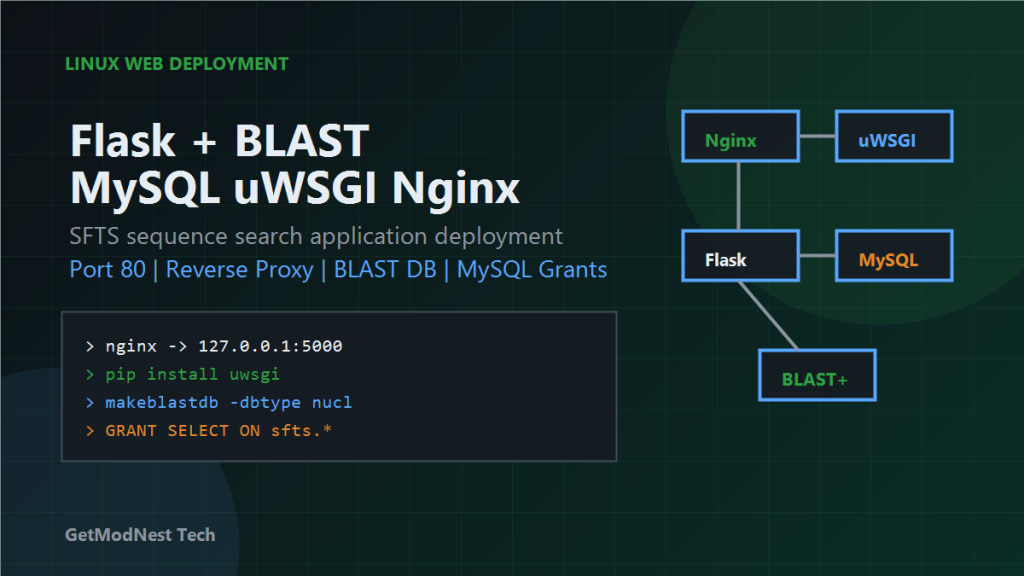
This article documents a practical Bioinformatics BLAST Web App deployment workflow for an SFTS Flask application on Linux. The system uses Flask as the web backend, MySQL as the database, BLAST for sequence search, uWSGI as the Python application server, and Nginx as the reverse proxy.
User browser -> Nginx port 80 -> uWSGI -> Flask -> MySQL / BLASTEnvironment
Server: Cloud server
OS: Linux
Web framework: Flask
Database: MySQL
ORM: SQLAlchemy
Application server: uWSGI
Reverse proxy: Nginx
Bioinformatics tool: NCBI BLAST+
HTTP port: 80
Flask internal port: 5000
Step 1: Open the Web Port
The web application needs to be reachable through HTTP.
Protocol: TCP
Port: 80
Source: 0.0.0.0/0
The request path is:
public internet -> cloud firewall -> Linux server -> Nginx -> FlaskStep 2: Deployment Architecture
Nginx listens on port 80
Nginx proxies requests to Flask on 127.0.0.1:5000
uWSGI runs the Flask application
Flask queries MySQL and calls BLAST when needed
Step 3: Prepare the Python Project Environment
Example project path:
/www/server/python_project/vhost/sftsActivate the environment:
source /www/server/panel/sfts/bin/activate
source /www/server/python_project/vhost/sfts.env
Install dependencies:
pip install -r requirements.txtStep 4: Fix uWSGI Command Not Found
One recorded error was:
failed to run command 'uwsgi': No such file or directoryInstall uWSGI inside the active environment:
pip install uwsgiIf installation fails with:
fatal error: Python.h: No such file or directoryinstall Python development headers and GCC:
yum install python3-devel gcc -yStep 5: Configure Nginx Reverse Proxy
location / {
    proxy_pass http://127.0.0.1:5000;
}
Reload Nginx:
nginx -t
systemctl reload nginx
Step 6: Install NCBI BLAST+
cd /usr/local
tar -xzf ncbi-blast-2.17.0+-x64-linux.tar.gz
Add BLAST to PATH:
echo 'export PATH=/usr/local/ncbi-blast-2.17.0+/bin:$PATH' >> ~/.bashrc
source ~/.bashrc
Verify:
blastn -versionNCBI BLAST+ can be downloaded from the official NCBI BLAST+ executables directory.
Step 7: Build the BLAST Database
cd /www/wwwroot/sfts/fasta
makeblastdb -in sfts-sequence.fasta -dbtype nucl -out sfts-sequence-db
Expected output files include:
.nin
.nsq
.nhr
Step 8: Configure BLAST Paths in Flask
BLASTN_EXE = "/usr/local/ncbi-blast-2.17.0+/bin/blastn"
BLAST_DB = "/www/wwwroot/sfts/fasta/sfts-sequence-db"
Using absolute paths avoids environment differences between the shell, uWSGI, and system services.
Step 9: Fix MySQL Permission Problems
One recorded MySQL error was:
SELECT command denied to user 'sfts-db'@'localhost'Temporary broad grant:
GRANT ALL PRIVILEGES ON *.* TO 'sfts-db'@'localhost' WITH GRANT OPTION;
FLUSH PRIVILEGES;
Safer production-style grant:
GRANT SELECT, INSERT, UPDATE, DELETE ON sfts.* TO 'sfts-db'@'localhost';
FLUSH PRIVILEGES;
Step 10: Check Runtime Logs
/www/wwwlogs/python/sfts/uwsgi.logWhen the application fails, check uWSGI startup logs, Python import errors, MySQL connection errors, BLAST command errors, and Nginx logs.
Common Problems
Website Cannot Open
cloud firewall port 80
Linux firewall
Nginx status
Nginx reverse proxy
uWSGI process
Flask app startup
uWSGI Cannot Start
Check whether uwsgi exists in the virtual environment and whether the service uses the correct Python environment.
Python.h Missing During uWSGI Installation
yum install python3-devel gcc -yBLAST Command Works in Shell but Not in Flask
Use absolute paths for both BLAST executable and database files.
BLAST Is Slow
limit API frequency
add request throttling
cache repeated search results
use threading lock if concurrent BLAST jobs conflict
optimize FASTA database size
Final Conclusion
This SFTS deployment combines Flask, MySQL, BLAST, uWSGI, and Nginx on Linux.
open port 80 in the cloud firewall
use Nginx as the public entry point
run Flask behind uWSGI
install uWSGI inside the correct virtual environment
use absolute paths for BLAST
fix MySQL permissions carefully
check uWSGI and Nginx logs when debugging
After these pieces are configured correctly, the browser can access the Flask application through Nginx, and the backend can perform database queries and BLAST sequence searches reliably.
FAQ
What is a BLAST web app?
A BLAST web app is a browser-based bioinformatics tool that lets users submit biological sequences, run BLAST searches on the server, and view matched sequence results through a web interface.
Can Flask be used for a bioinformatics sequence search system?
Yes. Flask can provide the web interface and API layer, while NCBI BLAST+ performs sequence search and MySQL stores application data or sequence metadata.
Why use absolute paths for BLAST in Flask?
Absolute paths avoid environment differences between interactive shell sessions, uWSGI processes, system services, and Nginx-managed deployments.
Why does BLAST work in the shell but fail in Flask?
This usually happens because the Flask or uWSGI process does not inherit the same PATH, environment variables, permissions, or working directory as the interactive shell.
How should a Flask BLAST app be deployed on Linux?
A common production setup is Nginx as the public reverse proxy, uWSGI as the Python application server, Flask as the web backend, MySQL as the database, and NCBI BLAST+ installed with absolute executable and database paths.
Need Help Deploying a Bioinformatics Web App?
This note is based on a real Flask, MySQL, BLAST, uWSGI, and Nginx deployment workflow. If you need help building or deploying a BLAST web app, sequence search portal, research database system, Flask API, Linux web service, or scientific data processing tool, GetModNest can provide practical development, troubleshooting, and deployment support.
Email: info@getmodnest.com