Overview
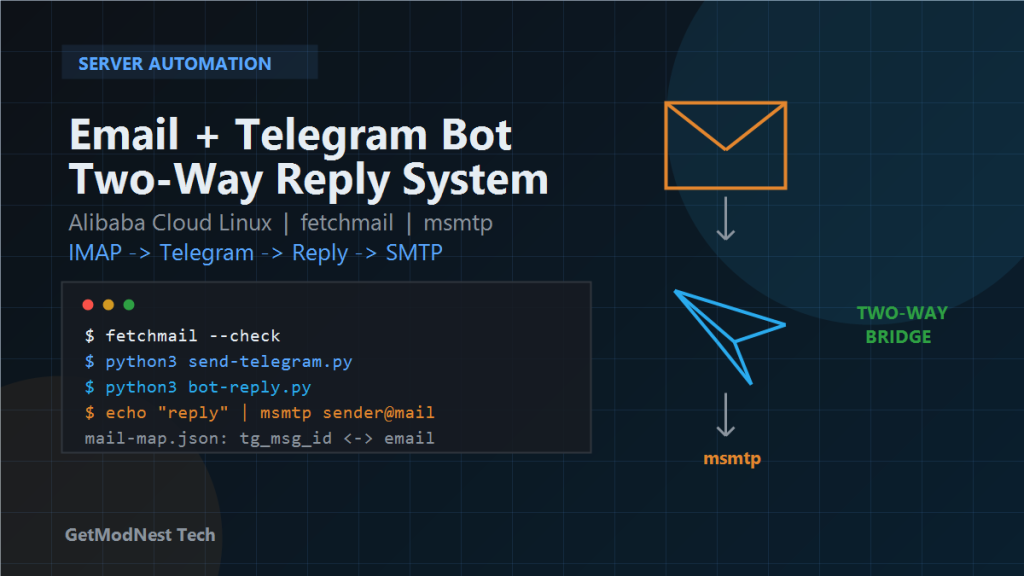
I wanted to build an email telegram bot. When a new email arrives, the server fetches it from IMAP and forwards the content to my Telegram bot. When I reply to that Telegram message, the server maps my reply back to the original sender and sends an email response through SMTP.
Email -> IMAP -> fetchmail -> Python script -> Telegram Bot
Telegram reply -> mapping file -> Python script -> msmtp -> original sender
This is useful for personal mail monitoring, small support workflows, or quickly replying to emails from a mobile phone without opening the mailbox directly.
Environment
- Server: Linux
- Reference system: RHEL / CentOS style Linux
- Mail receiving: IMAP over SSL
- Mail sending: SMTP over SSL
- Bot channel: Telegram Bot API
- Runtime: Python
- Tools:
fetchmail,msmtp,curl,requests
nc -zv smtp.example.qq.com 465
nc -zv imap.example.qq.com 993
Port 465 is for SMTP over SSL, and port 993 is for IMAP over SSL.
Required Tools
sudo dnf list installed fetchmail msmtp
sudo dnf install -y fetchmail msmtp
python3 -m pip install requests
Architecture
I split the system into three parts: fetchmail pulls new email, send-telegram.py forwards it to Telegram and records a mapping, and bot-reply.py or telegram-reply.py sends replies back through msmtp.
Telegram message ID <-> original email sender
mail-map.json
Step 1: Configure fetchmail
The receiving side uses fetchmail to pull messages from IMAP and pass them to a local script.
IMAP mailbox -> fetchmail -> send-telegram.py -> TelegramA typical configuration file is ~/.fetchmailrc.
poll imap.example.com protocol IMAP
  user "your_email@example.com"
  password "your_mail_auth_code"
  ssl
  mda "/usr/bin/python3 /opt/mailbot/send-telegram.py"
chmod 600 ~/.fetchmailrcFor many mail providers, the password should be an email client authorization code instead of the normal login password.
Step 2: Forward Email to Telegram
The send-telegram.py script reads email from standard input, extracts the sender and body, then calls Telegram Bot API to send a notification.
read email
parse sender
send Telegram message
save Telegram message ID and sender to mail-map.json
The required Telegram values are BOT_TOKEN and CHAT_ID. I obtained the bot token from BotFather.
Step 3: Get Telegram Chat ID
curl "https://api.telegram.org/bot<BOT_TOKEN>/getUpdates"Then I looked for message.chat.id. This value is the chat ID used when sending messages to myself.
Step 4: Configure msmtp
The reply side uses msmtp to send email through the SMTP server.
Telegram reply -> original sender lookup -> msmtp -> outgoing emailA typical configuration file is ~/.msmtprc.
defaults
auth on
tls on
tls_trust_file /etc/ssl/certs/ca-bundle.crt

account default
host smtp.example.com
port 465
tls_starttls off
from your_email@example.com
user your_email@example.com
password your_mail_auth_code
chmod 600 ~/.msmtprc
printf "Subject: msmtp test\n\nhello" | msmtp target@example.comStep 5: Listen for Telegram Replies
The bot-reply.py script calls Telegram getUpdates and checks whether a message is a reply to a previous bot message.
getUpdates
find reply_to_message
read reply_to_message.message_id
search mail-map.json
find original sender
send email reply
This means I need to reply directly to the forwarded Telegram message.
Step 6: Send the Email Reply
The telegram-reply.py script builds an email from my Telegram reply text and sends it through msmtp.
Telegram text -> target email -> subject/body -> msmtpStep 7: Run the Service
For a long-running bot process, I can use systemd or pm2. For periodic polling, I can use crontab.
/usr/bin/node /opt/mottbot/dist/index.js --gateway --port 8789
ps aux | grep mott
The Telegram notification and reply workflow uses the Telegram Bot API.
Security Notes
- Protect mailbox authorization codes and SMTP credentials.
- Protect the Telegram bot token.
- Do not publish real tokens in articles, screenshots, or repositories.
- Revoke the bot token immediately if it is exposed.
- Restrict permissions on
mail-map.json.
Troubleshooting
IMAP Connection Fails
nc -zv imap.example.com 993Check DNS, firewall, cloud security group, and whether IMAP access is enabled.
SMTP Sending Fails
nc -zv smtp.example.com 465Check msmtp configuration, TLS settings, sender address, and authorization code.
Telegram Updates Are Empty
curl "https://api.telegram.org/bot<BOT_TOKEN>/getUpdates"If webhook mode is enabled, polling with getUpdates may not work as expected.
Reply Mapping Cannot Be Found
Check whether the Telegram reply was sent as a direct reply and whether mail-map.json contains the correct Telegram message ID.
FAQ
What is an Email Telegram Bot?
An Email Telegram Bot is an automation workflow that forwards incoming email messages to Telegram and allows replies from Telegram to be sent back as email responses.
Can Telegram be used to reply to emails?
Yes. A server can map a Telegram reply to the original email sender and send the reply through SMTP using a tool such as msmtp.
How can incoming emails be forwarded to Telegram?
A Linux server can use IMAP and fetchmail to receive new messages, then a Python script can parse the email and call the Telegram Bot API to send a notification.
Is this a full helpdesk system?
No. This workflow is a lightweight email-to-Telegram bridge for personal mail monitoring, quick replies, and small support workflows. A full helpdesk system would need user management, ticket status, history, and team assignment features.
What credentials must be protected?
The mailbox authorization code, SMTP password, Telegram bot token, and mapping files should be protected with strict file permissions and never published in screenshots or repositories.
Final Result
new email arrives
Telegram notification appears
I reply in Telegram
server sends an email reply to the original sender
It is not a full helpdesk system, but it is enough for lightweight personal email handling and quick mobile replies.
Need Help Building an Automation Bot?
This note is based on a real Email Telegram Bot workflow. If you need help building an email notification bot, Telegram reply automation, support message bridge, Linux automation script, mailbox monitoring tool, or custom workflow integration, GetModNest can provide practical development, troubleshooting, and deployment support.
Email: info@getmodnest.com