Overview
This article documents a real-world data recovery case on a CentOS 8 server running MySQL 8.0.
An accidental DELETE operation removed critical rows from production tables. Because the database was not configured with ROW-format binlog, a simple binlog rollback was not feasible. A previous backup existed, but it had been created after the deletion had already happened, so it could not be used to restore the deleted data either.
The recovery was eventually achieved by copying the datadir from the production instance, starting a separate recovery instance with innodb_force_recovery, and using mysqldump to export the table structures from the recovered instance.
This article also summarizes the lessons learned and best practices to prevent similar situations in the future.
Environment
- OS: CentOS 8
- Database: MySQL 8.0
- Tables involved:
ims_yz_member ims_mc_member - Binlog format:
MIXED - Backup file observed during troubleshooting:
data_backup_2025-10-24_120720
Incident
An unintended batch DELETE operation was executed against production tables without proper safeguards.
The statements executed were similar to:
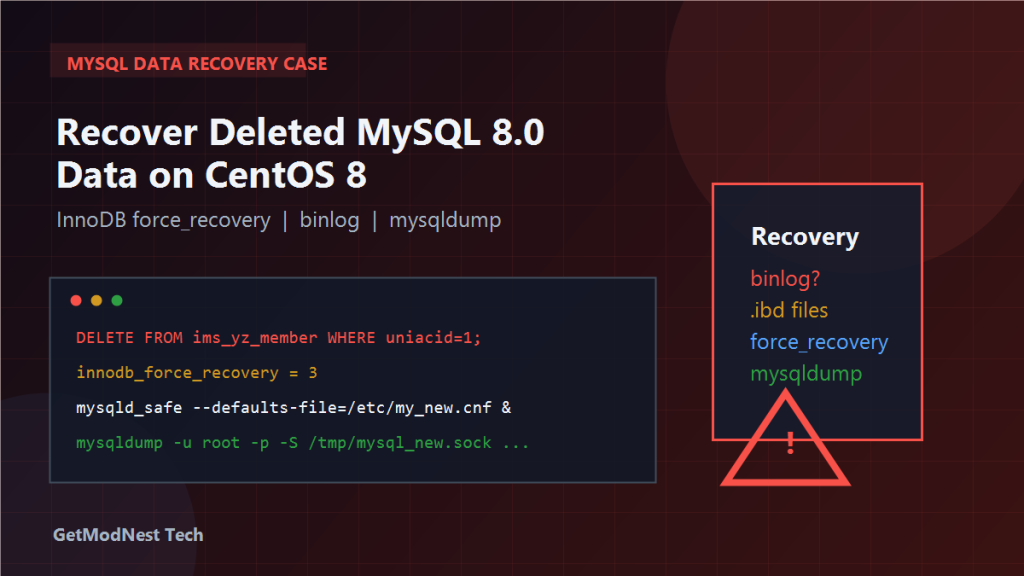
DELETE FROM ims_yz_member WHERE uniacid = 1;
DELETE FROM ims_mc_member WHERE uniacid = 1;
The data was deleted immediately.
Because the database was not using ROW-format binlog, and was instead configured with binlog_format = MIXED, the DELETE statements had already been written to the binlog as statement-based entries. That means there was no simple way to roll back or replay the exact row-level changes from the binlog.
Why Standard Recovery Methods Did Not Work
1. Binlog Recovery Was Not Feasible
The binlog_format was set to MIXED, which logs some operations as statements rather than individual row changes.
Since the DELETE operations were logged in statement mode, the binlog did not contain row-level “before” images of the deleted data. This made it impossible to simply roll back the deleted rows from binlog events.
Conclusion: using binlog rollback alone could not restore the data.
2. Using ibdata1 + ib_logfile + .ibd File-Level Recovery
Because binlog-based recovery was not possible, the alternative was a physical file-level recovery approach.
The general idea was:
- stop the production instance
- copy the entire
datadirto a separate recovery directory - configure and start a new recovery-only MySQL instance using the copied files
This method relies on the fact that InnoDB stores table data in .ibd files and uses shared tablespace files such as ibdata1 and redo log files such as ib_logfile0 / ib_logfile1.
3. Page-Level Recovery (Attempted but Limited)
Another approach considered was page-level recovery, which works by directly parsing .ibd files and trying to extract data from unpurged pages.
A tool such as Percona Data Recovery Tool was considered for this step. However, it was not fully successful in this case, and page_parser or similar utilities had limited results.
Conclusion: page-level recovery was not reliable enough to be the primary fix.
Recovery Process
Step 1: Copy the Production datadir
First, stop the production MySQL instance to prevent further changes.
Then copy the entire datadir to a new backup directory for recovery use.
This ensures that the recovery attempt does not affect the running production environment.
Step 2: Prepare a Separate Recovery Instance
The recovery instance needs its own configuration.
Key configuration points include:
- set
datadirto point to the copied backup directory - set
innodb_force_recovery = 3 - avoid network conflicts by using a socket file instead of TCP
Example socket path used:
/tmp/mysql_new.sockStep 3: Start the Recovery Instance
Start the recovery instance using:
mysqld_safe --defaults-file=/etc/my_new.cnf &The innodb_force_recovery setting allows MySQL to start even when the InnoDB data files contain inconsistencies or are not cleanly shut down.
At recovery level 3, InnoDB skips transaction rollback after crash recovery. This means it reads committed data as-is, which can be enough to recover table structures and data that was already flushed to disk before the deletion happened.
Step 4: Export Table Structures and Data with mysqldump
After the recovery instance started successfully, mysqldump was used to export the target table.
Example command:
mysqldump -u root -p -S /tmp/mysql_new.sock jx_zhiyun99_ne ims_yz_member > ims_yz_member_recover.sqlStep 5: Check the Results
The mysqldump export completed successfully, and the table structure was intact.
However, the generated SQL file did not contain the previously deleted rows. This was expected because InnoDB had already committed the DELETE operation and the data pages may have already been purged.
Analysis
When DELETE is committed and the InnoDB purge process has already cleaned the undo log entries, the deleted rows are physically removed from the data pages.
At that point, even innodb_force_recovery cannot bring those rows back because InnoDB has already processed the commit and the background purge.
This means the recoverability of deleted data depends heavily on how much time has passed since the deletion and whether the purge thread has already processed the undo records.
Outcome
What Worked
- The recovery instance was set up correctly using the copied
datadirandinnodb_force_recovery = 3 mysqldumpsuccessfully exported the table structure from the recovered instance- The approach avoided further damage to the production instance
What Did Not Work
- The actual deleted data could not be fully recovered because the
DELETEhad already been committed and the data had been purged by InnoDB - The existing
dumpbackup had been taken after the deletion, so it did not contain the missing rows - There was no usable pre-deletion full backup available
- The backup file
data_backup_2025-10-24_120720was created after the deletion had already occurred, so it could not be used for row-level recovery - Page-level recovery tools such as
page_parserhad limited success and could not reliably extract the deleted rows
Lessons Learned
1. Backups Must Be Regular and Complete
For production environments and critical tables, there must be scheduled, verified backups.
Recommended backup tools include mysqldump and Percona XtraBackup.
2. Enable ROW-Format Binlog
Setting binlog_format = ROW allows precise row-level recovery from binlog in case of accidental deletion.
With ROW format, even a mistaken DELETE can potentially be reversed by replaying the binlog in reverse.
3. Establish Safe Operation Procedures for Deletions
Before executing any destructive operation on production data, always take a backup first.
When possible, wrap risky SQL in a transaction for validation before committing:
START TRANSACTION;
DELETE ...
-- verify the affected rows
ROLLBACK; -- or COMMIT;
This gives an opportunity to review changes before they become permanent.
4. Build a Recovery Practice Environment
Having a tested recovery procedure and a standby recovery instance ready can significantly reduce the time and risk involved when a real incident happens.
When the incident occurs, the focus should be on identifying the correct datadir and restoring to the right instance. Do not attempt recovery directly on the production server.
Summary of the Recovery Experience
What Succeeded
- The recovery instance was built correctly using the backup
datadirandinnodb_force_recovery = 3 - Table structure was recovered through
mysqldump
What Was Limited
- Deleted row data could not be fully restored because InnoDB had already purged the undo records
- Page-level recovery with tools like
page_parserwas attempted but had limited effectiveness
Key Takeaways
- always maintain regular, pre-incident backups
- use
binlog_format = ROWso that row-level binlog recovery is possible - never execute
DELETEon production data without a backup and a transaction-based validation step - when recovery is needed, use a separate instance with
innodb_force_recoveryto avoid further damage - page-level recovery is a last resort and its success is not guaranteed
Need Help with a Similar Problem or Project?
This note is based on a real troubleshooting, configuration, or development workflow. If you need help with databases, Linux servers, web applications, desktop software, iOS and Android apps, automation scripts, deployment, or AI development environments, GetModNest can provide practical technical support, troubleshooting, and development assistance.
Email: info@getmodnest.com