Overview
This article documents a practical Oracle Database 11g import case on Windows.
The goal was to import a database dump file named YONBIPV3-1028.DMP into a local Oracle database by using Oracle Data Pump Import, impdp.
The process required creating tablespaces, creating the target user, granting permissions, creating an Oracle Directory object, copying the dump file to the correct filesystem path, and fixing common errors such as ORA-31640, ORA-04002, and OS error 2.
Environment
- Database: Oracle Database 11g Enterprise Edition Release 11.2.0.4.0
- Client tool: PL/SQL Developer
- Administration login:
Local/System - Oracle installation path:
D:\Oracle\product\11.2.0\dbhome_1 - Dump file:
YONBIPV3-1028.DMP - Intended dump directory:
D:\ufida_standard\dump
Goal
The goal was to import the dump file into a local Oracle database and restore the schema data into a user named:
YONYOUBIPThe import command used REMAP_SCHEMA so that objects from the source schema could be imported into the target schema.
Step 1: Create Required Tablespaces
In PL/SQL Developer, several tablespaces were created first:
CREATE TABLESPACE NNC_DATA01
DATAFILE 'D:\ufida_standard\data\nnc_data01.dbf'
SIZE 500M AUTOEXTEND ON NEXT 50M
EXTENT MANAGEMENT LOCAL UNIFORM SIZE 256K;

CREATE TABLESPACE NNC_DATA02
DATAFILE 'D:\ufida_standard\data\nnc_data02.dbf'
SIZE 300M AUTOEXTEND ON NEXT 50M
EXTENT MANAGEMENT LOCAL UNIFORM SIZE 256K;

CREATE TABLESPACE NNC_DATA03
DATAFILE 'D:\ufida_standard\data\nnc_data03.dbf'
SIZE 500M AUTOEXTEND ON NEXT 100M
EXTENT MANAGEMENT LOCAL UNIFORM SIZE 256K;
The result was successful, which confirmed that the database could create datafiles in the specified path.
Step 2: Create the Target User and Grant Permissions
After the tablespaces were created, the target user was created:
CREATE USER YONYOUBIP IDENTIFIED BY YONYOUBIP
DEFAULT TABLESPACE NNC_DATA01
TEMPORARY TABLESPACE temp;
Then permissions were granted:
GRANT connect, dba TO YONYOUBIP;In production environments, granting DBA should be avoided unless it is truly required. For a controlled local restoration environment, it is often used temporarily to reduce permission issues during import.
Step 3: Create an Oracle Directory Object
Oracle Data Pump does not read arbitrary filesystem paths directly from the command line. Instead, it uses a database object called a Directory object.
DROP DIRECTORY imp_dp;

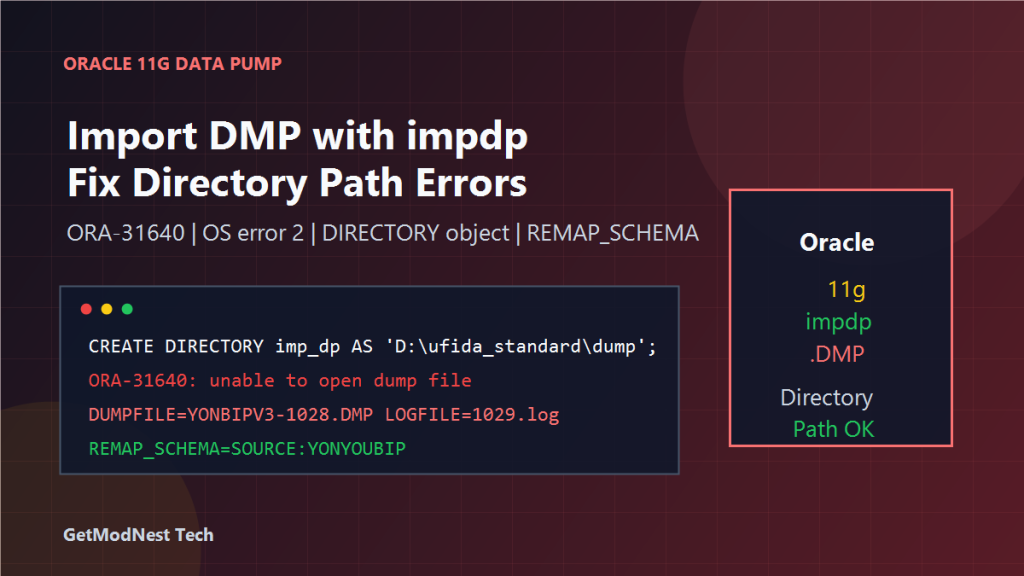
CREATE DIRECTORY imp_dp AS 'D:\ufida_standard\dump';

GRANT READ, WRITE ON DIRECTORY imp_dp TO YONYOUBIP;
This creates a database-level alias named imp_dp, pointing to the Windows path:
D:\ufida_standard\dumpStep 4: Verify the Directory Object
The directory object can be checked with:
SELECT directory_name, directory_path
FROM dba_directories
WHERE directory_name = 'IMP_DP';
A common misunderstanding is to assume that creating an Oracle Directory object also creates the Windows folder. It does not.
The Windows folder must already exist on disk, and the Oracle service account must have permission to read from it.
Step 5: Check the Real Windows Folder
The actual folder should exist on the Windows filesystem:
D:\ufida_standard\dumpIf the folder does not exist, create it manually in Windows.
Also make sure the Oracle database service account, such as Local System, has permission to access this folder.
Step 6: Run impdp from the Oracle BIN Directory
The command prompt was opened and switched to the Oracle BIN directory:
cd D:\Oracle\product\11.2.0\dbhome_1\BINThen the import command was executed:
impdp YONYOUBIP/YONYOUBIP DIRECTORY=imp_dp DUMPFILE=YONBIPV3-1028.DMP LOGFILE=1029.log REMAP_SCHEMA=YONYOUBIP:YONYOUBIPThe important parameters are:
DIRECTORY=imp_dp: Oracle Directory object nameDUMPFILE=YONBIPV3-1028.DMP: dump file name under that directoryLOGFILE=1029.log: import log file nameREMAP_SCHEMA=YONYOUBIP:YONYOUBIP: remap source schema to target schema
Error 1: ORA-31640 Unable to Open Dump File
One error encountered was:
ORA-31640: unable to open dump file for readThis means Oracle Data Pump could not open the dump file from the directory object path.
Possible causes include a missing dump file, misspelled filename, insufficient Oracle service account permission, or a Directory object pointing to the wrong folder.
Error 2: OS error 2 File Not Found
Another important message was:
OS error 2On Windows, OS error 2 usually means:
The system cannot find the file specified.In this case, the cause was that YONBIPV3-1028.DMP was not located under:
D:\ufida_standard\dumpStep 7: Copy the Dump File to the Correct Directory
The dump file must be placed in the exact physical folder mapped by imp_dp:
D:\ufida_standard\dump\YONBIPV3-1028.DMPAfter copying the file to this directory, the same impdp command can be executed again.
Import Log Review
After import execution, the log file was generated under the dump directory:
D:\ufida_standard\dump\1029.logThe log file should be reviewed carefully to check whether all tables, indexes, constraints, and other objects were imported successfully.
Root Cause Analysis
The main problem was not the impdp command itself.
The issue was the mismatch between:
- the Oracle Directory object path
- the actual Windows folder
- the real location of the
.DMPfile - Oracle service account permissions
Oracle could see the Directory object, but when Data Pump tried to open the dump file, the file was not found at the mapped path.
Recommended Checklist
1. Tablespaces Exist
SELECT tablespace_name
FROM dba_tablespaces
WHERE tablespace_name LIKE 'NNC_DATA%';
2. Target User Exists
SELECT username
FROM dba_users
WHERE username = 'YONYOUBIP';
3. Directory Object Exists
SELECT directory_name, directory_path
FROM dba_directories
WHERE directory_name = 'IMP_DP';
4. Directory Privileges Are Granted
GRANT READ, WRITE ON DIRECTORY imp_dp TO YONYOUBIP;5. Dump File Exists in the Mapped Folder
D:\ufida_standard\dump\YONBIPV3-1028.DMPCorrected Import Command
cd D:\Oracle\product\11.2.0\dbhome_1\BIN

impdp YONYOUBIP/YONYOUBIP DIRECTORY=imp_dp DUMPFILE=YONBIPV3-1028.DMP LOGFILE=1029.log REMAP_SCHEMA=YONYOUBIP:YONYOUBIP
If the source schema name inside the dump is different from the target schema, adjust REMAP_SCHEMA accordingly:
REMAP_SCHEMA=SOURCE_SCHEMA:YONYOUBIPFinal Verification After Import
After the import finishes, verify the result in PL/SQL Developer or SQL*Plus.
SELECT object_type, COUNT(*)
FROM user_objects
GROUP BY object_type
ORDER BY object_type;
Check invalid objects:
SELECT object_name, object_type, status
FROM user_objects
WHERE status <> 'VALID';
Check table count:
SELECT COUNT(*)
FROM user_tables;
Also review the Data Pump log:
D:\ufida_standard\dump\1029.logFinal Conclusion
The Oracle Data Pump import failed because the dump file was not found in the directory mapped by the Oracle Directory object.
The key fix was to create the Directory object imp_dp, point it to D:\ufida_standard\dump, grant READ and WRITE on it to the import user, copy YONBIPV3-1028.DMP into that exact folder, and rerun impdp.
The most important lesson is that DIRECTORY=imp_dp does not mean the current command-line folder. It means the database Directory object path.
For Oracle Data Pump, always verify both the database Directory object and the real operating system path before running the import.
Need Help with a Similar Problem or Project?
This note is based on a real troubleshooting, configuration, or development workflow. If you need help with databases, Linux servers, web applications, desktop software, iOS and Android apps, automation scripts, deployment, or AI development environments, GetModNest can provide practical technical support, troubleshooting, and development assistance.
Email: info@getmodnest.com