Overview
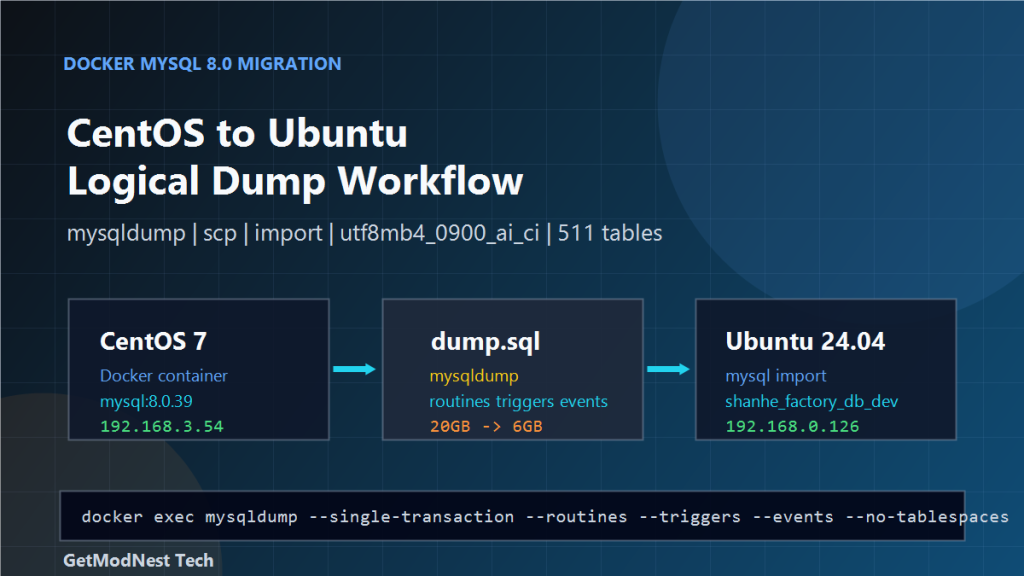
This article walks through a practical MySQL migration from a Docker-based source database on CentOS to a target MySQL environment on Ubuntu.
The source database runs inside a Docker container named 1Panel-mysql-DId8. The target server is an Ubuntu host. The migration uses mysqldump, scp, and a normal MySQL import.
CentOS Docker MySQL source
  -> mysqldump logical backup
  -> scp transfer
  -> Ubuntu MySQL import
  -> validation
The database involved in the migration is:
shanhe_factory_db_devEnvironment
- Source operating system: CentOS 7
- Target operating system: Ubuntu 24.04
- Source database container:
1Panel-mysql-DId8 - Source MySQL image:
mysql:8.0.39 - Source MySQL port mapping:
0.0.0.0:3306 -> 3306 - Source server IP:
192.168.3.54 - Target server IP:
192.168.0.126 - Export method:
mysqldumpinside Docker - Transfer method:
scp - Import method:
mysqlclient on Ubuntu - Dump file path on source:
/mnt/sdc-mysql/dump.sql
The main objective is to preserve database structure, data, routines, triggers, events, character set, and collation during the migration.
Step 1: Check Basic System Information
Before starting the migration, confirm the operating system and kernel information on both servers.
uname -a
cat /etc/redhat-release
cat /etc/os-release
In this environment:
Source server: CentOS 7
Target server: Ubuntu 24.04
Step 2: Check Network Information
Check the IP address on each server:
ip addrThe working addresses were:
Source server IP: 192.168.3.54
Target server IP: 192.168.0.126
The two servers must be able to reach each other through SSH and, if direct database access is needed, MySQL port 3306.
Step 3: Check the MySQL Version
mysql -VInside MySQL, the server version can also be checked with:
SELECT VERSION();For this source container, the image was:
mysql:8.0.39Keeping the target MySQL version close to the source version reduces migration risk.
Step 4: Confirm Docker Status on the Source Server
systemctl status docker
docker version
docker ps
The source container information was:
Container ID: bcd007f907d
Container name: 1Panel-mysql-DId8
Image: mysql:8.0.39
Port: 0.0.0.0:3306 -> 3306
The container name is important because it is used by docker exec during database inspection and export.
Step 5: Enter the Source MySQL Container
docker exec -it 1Panel-mysql-DId8 mysql -u shanhe_factory_db_dev -pDepending on how the container was created, the login user may be an application user or root.
If the application user does not have enough privileges for full export, use a privileged MySQL account for the dump operation.
Step 6: Inspect the Source Database
Count the number of tables in the database:
SELECT COUNT(*)
FROM information_schema.tables
WHERE table_schema = 'shanhe_factory_db_dev';
The source environment had:
511 tablesThis count is useful as a quick comparison after importing data on the target server.
Step 7: Check Character Set and Collation
SHOW VARIABLES LIKE 'character_set%';
SHOW VARIABLES LIKE 'collation%';
SHOW CREATE DATABASE shanhe_factory_db_dev;
The observed settings were:
Character set: utf8mb4
Collation: utf8mb4_0900_ai_ci
This is important when importing into another MySQL 8.0 environment. If the target server is older or uses MariaDB, utf8mb4_0900_ai_ci may not be supported.
Step 8: Export the Database with mysqldump
docker exec -i 1Panel-mysql-DId8 mysqldump \
  -u shanhe_factory_db_dev \
  -p shanhe_factory_db_dev \
  --default-character-set=utf8mb4 \
  --single-transaction \
  --routines --triggers --events \
  --set-charset \
  --no-tablespaces \
  shanhe_factory_db_dev \
  > /mnt/sdc-mysql/dump.sql
Important options:
--default-character-set=utf8mb4keeps export encoding explicit.--single-transactionavoids locking InnoDB tables for a long time.--routines --triggers --eventsincludes database program objects.--set-charsetwrites character set statements into the dump.--no-tablespacesavoids tablespace-related privilege or compatibility errors.
The dump size changed significantly after export optimization:
Before: about 20 GB
After:  about 6 GB
Step 9: Transfer the Dump File to Ubuntu
scp -C /mnt/sdc-mysql/dump.sql shanhe@192.168.0.126:/home/shanhe/The -C option enables compression during transfer.
ls -lh /home/shanhe/dump.sqlStep 10: Prepare the Target Database on Ubuntu
CREATE DATABASE shanhe_factory_db_dev
  DEFAULT CHARACTER SET utf8mb4
  COLLATE utf8mb4_0900_ai_ci;
If the database already exists and is safe to replace, drop and recreate it only after confirming that no required data will be lost.
Step 11: Import the Dump on Ubuntu
cd /home/shanhe
mysql -uroot -p shanhe_factory_db_dev < dump.sql
If the dump includes CREATE DATABASE and USE statements, it can also be imported without specifying the database name:
mysql -uroot -p < dump.sqlFor a large import, run the command inside screen or tmux to avoid interruption when the SSH session disconnects.
Step 12: Validate the Import
SELECT COUNT(*)
FROM information_schema.tables
WHERE table_schema = 'shanhe_factory_db_dev';
Compare it with the source count:
Source table count: 511
Target table count: should match source
Check database character set and collation:
SHOW CREATE DATABASE shanhe_factory_db_dev;
SHOW VARIABLES LIKE 'character_set%';
SHOW VARIABLES LIKE 'collation%';
If the application has key business tables, run targeted row counts and sample queries against those tables as well.
Step 13: Common Migration Problems
Permission Error During Dump
If the dump user lacks privileges for routines, triggers, events, or tablespaces, the export may fail.
Unsupported Collation on Target
If the target is not MySQL 8.0, utf8mb4_0900_ai_ci may fail during import.
Large Dump Transfer Is Slow
Use scp -C, compress the dump, or transfer through a faster internal network path.
Import Takes Too Long
Run the import in tmux, monitor disk usage, and avoid killing the session midway.
Docker Volume Path Is Wrong
When dumping from a container to the host, make sure the redirected path is on the host side.
/mnt/sdc-mysql/dump.sqlStep 14: Recommended Verification Checklist
- Source OS and target OS are confirmed.
- Source and target IP addresses are confirmed.
- Docker service is running on the source server.
- Source MySQL container name is confirmed.
- Source MySQL version is checked.
- Source database table count is recorded.
- Source character set and collation are recorded.
mysqldumpincludes routines, triggers, and events.- Dump file is transferred successfully to Ubuntu.
- Target database is created with compatible character set and collation.
- Import finishes without fatal errors.
- Target table count matches the source.
- Application key tables pass sample validation.
- Application connection settings are switched only after validation.
Final Conclusion
The Docker MySQL 8.0 migration from CentOS to Ubuntu was completed through a logical dump workflow.
The key steps were to inspect the source environment, confirm Docker and container details, verify table count and character set, export the database with mysqldump, transfer the dump with scp, import it into Ubuntu, and validate the target database.
For this migration, the most important technical points were preserving utf8mb4, keeping the utf8mb4_0900_ai_ci collation for MySQL 8.0 compatibility, including routines, triggers, and events, and comparing table counts before and after import.
This approach is straightforward and reliable for controlled database migration windows where a logical backup and restore can be completed within the allowed downtime.
Need Help with a Similar Problem or Project?
This note is based on a real troubleshooting, configuration, or development workflow. If you need help with databases, Linux servers, web applications, desktop software, iOS and Android apps, automation scripts, deployment, or AI development environments, GetModNest can provide practical technical support, troubleshooting, and development assistance.
Email: info@getmodnest.com