Overview
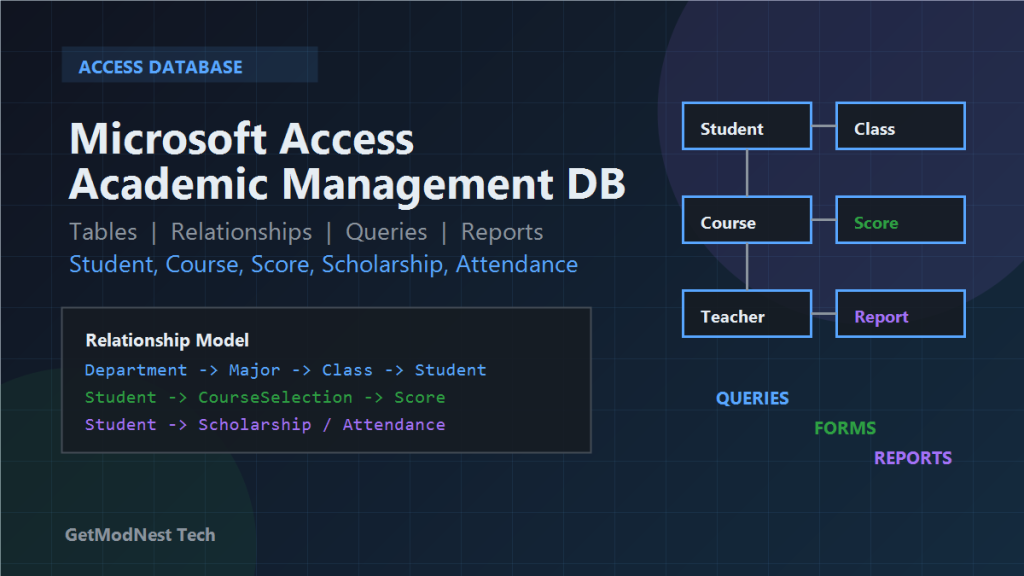
This article documents a Microsoft Access database design for a small academic management system. The goal is to manage departments, majors, classes, students, teachers, courses, course selections, scores, scholarships, attendance, queries, forms, and reports.
Environment
Tool: Microsoft Access
Scenario: Academic management system
Objects: Tables, Queries, Forms, Reports
Focus: Relational database design and practical data entry
Main Requirements
- manage departments, majors, classes, students, and teachers
- manage courses, course selections, and scores
- record scholarships and attendance
- query students, courses, scores, and awards
- generate student lists, transcripts, score summaries, and scholarship reports
Main Tables
Department
Major
Class
Student
Teacher
Course
CourseSelection
Score
Scholarship
Attendance
Suggested Table Structure
Department
DepartmentID
DepartmentName
OfficeLocation
Phone
Description
Major
MajorID
MajorName
DepartmentID
DegreeType
StudyYears
Description
Department.DepartmentID -> Major.DepartmentIDClass
ClassID
ClassName
MajorID
EnrollmentYear
Counselor
ClassRoom
Major.MajorID -> Class.MajorIDStudent
StudentID
StudentName
Gender
BirthDate
ClassID
Phone
Email
Address
EnrollmentDate
Status
Class.ClassID -> Student.ClassIDTeacher
TeacherID
TeacherName
Gender
Title
DepartmentID
Phone
Email
HireDate
Course
CourseID
CourseName
CourseType
Credit
Hours
DepartmentID
TeacherID
Semester
CourseSelection
SelectionID
StudentID
CourseID
SelectDate
Semester
Status
This table resolves the many-to-many relationship between students and courses.
StudentID + CourseID + SemesterScore
ScoreID
SelectionID
RegularScore
ExamScore
FinalScore
GradePoint
PassStatus
InputDate
FinalScore = RegularScore * 0.3 + ExamScore * 0.7Scholarship
ScholarshipID
StudentID
ScholarshipName
Level
Amount
AwardDate
AcademicYear
Reason
Attendance
AttendanceID
StudentID
CourseID
AttendanceDate
AttendanceStatus
Remark
Present
Late
Leave
AbsentRelationship Model
Department 1 -> many Majors
Major 1 -> many Classes
Class 1 -> many Students
Department 1 -> many Teachers
Teacher 1 -> many Courses
Student many -> many Courses through CourseSelection
CourseSelection 1 -> 1 Score
Student 1 -> many Scholarships
Student 1 -> many Attendance records
Query Design
Student Query
Search students by student number, name, gender, class, major, or department.
Student -> Class -> Major -> DepartmentCourse Query
Search courses by course name, teacher, semester, course type, or credit.
Score Query
Search student scores and academic results.
Student -> CourseSelection -> Course -> ScoreScholarship Query
Search scholarship records by year, level, class, major, or student.
Attendance Query
Search attendance by date range, student, course, class, or status.
Aggregation Queries
student count by department
average score by course
highest and lowest score by course
pass rate by course
scholarship amount by academic year
absence count by student
Form Design
Student Information Form
Teacher Information Form
Course Information Form
Course Selection Form
Score Entry Form
Scholarship Entry Form
Attendance Entry Form
Query Navigation Form
Report Design
Student List Report
Class Student Report
Course List Report
Student Transcript Report
Course Score Summary Report
Scholarship Report
Attendance Summary Report
Validation Rules
StudentID: required and unique
CourseID: required and unique
Credit: greater than 0
Scores: between 0 and 100
AttendanceStatus: Present, Late, Leave, or Absent
Implementation Order
- create the Access database file
- create master tables
- create relationship tables
- set primary keys and indexes
- create relationships and enable referential integrity
- enter sample data
- build common queries
- create forms
- create reports
- test the workflow
Final Conclusion
The key idea is to separate master data from relationship data.
Master data: Department, Major, Class, Student, Teacher, Course
Relationship data: CourseSelection, Score, Scholarship, Attendance
With this structure, Access can support daily data entry, flexible queries, score analysis, award statistics, attendance tracking, and printable reports.
Need Help with a Similar Problem or Project?
This note is based on a real troubleshooting, configuration, or development workflow. If you need help with databases, Linux servers, web applications, desktop software, iOS and Android apps, automation scripts, deployment, or AI development environments, GetModNest can provide practical technical support, troubleshooting, and development assistance.
Email: info@getmodnest.com