Overview
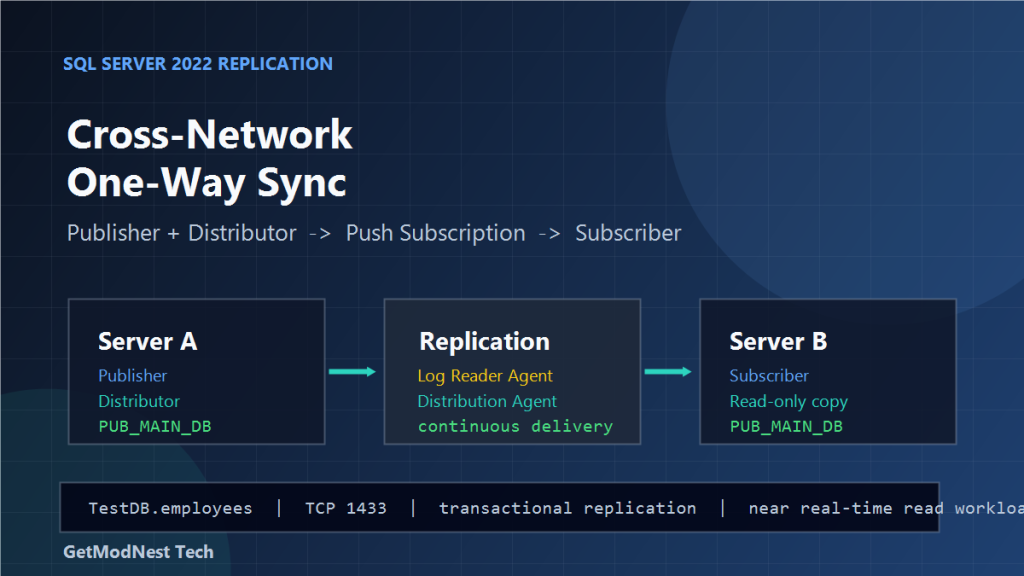
This article walks through a SQL Server 2022 one-way synchronization setup across two different networks.
The target design is:
Primary database on Server A -> Read-only copy on Server BThe implementation uses SQL Server transactional replication with push subscription. Server A acts as both Publisher and Distributor, while Server B acts as Subscriber.
This setup is suitable when the downstream database is used for query, reporting, or backup-like read scenarios, while all writes still happen on the source database.
Environment
- Database platform: SQL Server 2022
- Source server: Server A
- Target server: Server B
- Synchronization direction: one-way
- Synchronization mode: near real-time continuous replication
- Replication type: transactional replication
- Subscription type: push subscription
- Test database:
TestDB - Replicated table:
employees
Example addresses used during testing:
Publisher / Distributor: 192.168.176.63
Subscriber:              192.168.176.62
The source and target database name used in the workflow was:
PUB_MAIN_DBFinal Architecture
The final topology was:
Server A
  SQL Server
  Publisher
  Distributor
  Log Reader Agent
  Distribution Agent
        |
        | push subscription
        v
Server B
  SQL Server
  Subscriber
  Read-only synchronized database
Data flow:
source table write
  -> transaction log
  -> Log Reader Agent
  -> distribution database
  -> Distribution Agent
  -> subscriber database
The subscriber database is treated as read-only from the application perspective. Business writes should continue to go to Server A only.
Why Transactional Replication Was Used
The goal was not full HA failover. The goal was cross-network, one-way, table-level data synchronization.
Transactional replication fits this requirement because:
- it supports near real-time synchronization
- it can replicate selected tables instead of the whole instance
- the subscriber can serve read workloads
- it works well for one-way data movement
- it provides a clear Publisher, Distributor, and Subscriber model
Availability Groups or database mirroring are more focused on database-level high availability. They are not the best match when the downstream database is mainly used as a query copy.
Key Replication Roles
Publisher
The Publisher is the source database server. It owns the original tables and defines which objects are published.
Server A = PublisherDistributor
The Distributor stores replication metadata and pending commands in the distribution database.
Server A = DistributorSubscriber
The Subscriber receives replicated data from the publication.
Server B = SubscriberLog Reader Agent
The Log Reader Agent scans the transaction log of the publication database and moves committed replication commands into the distribution database.
Distribution Agent
The Distribution Agent takes commands from the distribution database and applies them to the Subscriber. Because this setup uses push subscription, the Distribution Agent runs from the Distributor side and pushes changes to Server B.
Step 1: Prepare Network Access
Before configuring replication, verify basic SQL Server connectivity between Server A and Server B.
TCP 1433Recommended checks:
- SQL Server service is running on both servers
- TCP/IP protocol is enabled
- SQL Server listens on a predictable port
- Windows Firewall allows inbound SQL Server traffic
- both servers can resolve each other by IP or hostname
- the replication agent account can connect to both SQL Server instances
For named instances or dynamic ports, configure a fixed port whenever possible.
Step 2: Prepare Source and Target Databases
Create or confirm the source database on Server A:
CREATE DATABASE PUB_MAIN_DB;
GO
Create or confirm the target database on Server B:
CREATE DATABASE PUB_MAIN_DB;
GO
For a first validation, use a small database such as TestDB.
Step 3: Create a Test Table
On Server A, create a test table:
USE TestDB;
GO

CREATE TABLE employees (
    EmpID INT IDENTITY(1,1) PRIMARY KEY,
    Name NVARCHAR(150) NOT NULL,
    Gender NVARCHAR(10),
    Age INT,
    Department NVARCHAR(150),
    Salary DECIMAL(10,2),
    HireDate DATE
);
GO
The table includes an identity primary key. Transactional replication requires a primary key for published tables.
Insert a test row:
INSERT INTO employees (Name, Gender, Age, Department, Salary, HireDate)
VALUES (N'Zhao Liu', N'Male', 30, N'Technology', 10000.00, '2025-01-01');
GO
Validate the source data:
SELECT * FROM employees;
GO
Step 4: Configure the Distributor
On Server A, configure SQL Server replication distribution.
- connect to Server A
- expand
Replication - right-click
Replication - choose
Configure Distribution - select Server A as its own Distributor
- create the distribution database
- configure the snapshot folder
- finish the wizard
The distribution database stores replication commands and metadata. The snapshot folder must be accessible by the SQL Server Agent account and replication agents.
Step 5: Create a Transactional Publication
On Server A:
- expand
Replication - right-click
Local Publications - choose
New Publication - select the source database, such as
PUB_MAIN_DBorTestDB - choose
Transactional publication - select the tables to publish
- include
employeesduring the first test - configure the Snapshot Agent
- create the publication
After creating the publication, generate the initial snapshot. The initial snapshot initializes the subscriber with schema and baseline data.
Step 6: Create a Push Subscription
A push subscription is managed from the Publisher/Distributor side.
- right-click the publication
- choose
New Subscriptions - select
Run all agents at the Distributor - choose Server B as the Subscriber
- choose or create the target database
- configure Distribution Agent security
- select continuous synchronization
- finish the wizard
Publication -> Push Subscription -> Server BContinuous synchronization keeps the subscriber updated as transactions are committed on the publisher.
Step 7: Validate Initial Synchronization
After the snapshot and agents complete, connect to Server B and query the subscriber table:
USE TestDB;
GO

SELECT * FROM employees;
GO
The row inserted on Server A should appear on Server B.
If the table exists but no rows appear, check Snapshot Agent, Log Reader Agent, Distribution Agent, Replication Monitor errors, account permissions, and subscriber initialization.
Step 8: Validate Ongoing Replication
Insert another row on Server A:
USE TestDB;
GO

INSERT INTO employees (Name, Gender, Age, Department, Salary, HireDate)
VALUES (N'Wang Ming', N'Male', 28, N'Operations', 8500.00, '2025-02-01');
GO
Then query Server B:
USE TestDB;
GO

SELECT * FROM employees;
GO
If continuous replication is healthy, the new row should arrive shortly.
Step 9: Monitor Replication Agents
Use Replication Monitor in SSMS to inspect the pipeline.
- Snapshot Agent
- Log Reader Agent
- Distribution Agent
- undistributed commands
- delivery latency
- agent error messages
Publisher transaction log
  -> Log Reader Agent
  -> distribution database
  -> Distribution Agent
  -> Subscriber
If commands reach the distribution database but not the Subscriber, focus on the Distribution Agent and network/login permissions to Server B. If commands never reach the distribution database, focus on the Log Reader Agent and publication database permissions.
Step 10: Keep the Subscriber Read-Only
Transactional replication does not automatically make the subscriber safe for application writes.
Recommended controls:
- do not point write applications to Server B
- use a dedicated read-only login for query workloads
- deny insert, update, and delete permissions on subscriber tables for application users
- keep Server A as the only write source
Common Problems and Fixes
SQL Server Agent Is Not Running
Replication agents depend on SQL Server Agent. If replication jobs do not start, check SQL Server Agent first on Server A.
TCP/IP Is Disabled
If the two servers cannot connect through SQL Server, enable TCP/IP in SQL Server Configuration Manager and restart SQL Server.
Firewall Blocks SQL Server Traffic
TCP 1433If a named instance uses dynamic ports, configure a fixed port before continuing.
Snapshot Folder Is Not Accessible
If the initial snapshot fails, check the snapshot folder path and permissions.
Published Table Has No Primary Key
Transactional replication requires a primary key on each published table.
Agent Login Fails
Verify that the replication login is valid, the password is correct, the login is mapped to the required database, and the default database is online.
Subscriber Falls Behind
If the subscriber becomes delayed, check network latency, large transactions, blocking on the subscriber, disk performance on the Distributor, and undistributed command count.
Practical Verification Checklist
- SQL Server Agent is running on Server A.
- Server A can connect to Server B by SQL Server port.
- Distributor is configured on Server A.
- Transactional publication exists on Server A.
- Initial snapshot completed successfully.
- Push subscription points to Server B.
- Log Reader Agent is running.
- Distribution Agent is running.
- Test inserts on Server A appear on Server B.
- Business users only read from Server B.
- Application writes stay on Server A.
Example End-to-End Test
On Server A:
USE TestDB;
GO

INSERT INTO employees (Name, Gender, Age, Department, Salary, HireDate)
VALUES (N'Chen Wei', N'Male', 32, N'Database Team', 12000.00, '2025-03-01');
GO
On Server B:
USE TestDB;
GO

SELECT EmpID, Name, Gender, Age, Department, Salary, HireDate
FROM employees
ORDER BY EmpID;
GO
Expected result:
The row inserted on Server A appears on Server B after the Distribution Agent delivers the command.Final Conclusion
The SQL Server 2022 cross-network one-way synchronization was implemented with transactional replication.
Server A worked as Publisher and Distributor. Server B worked as Subscriber. The publication pushed data changes through the Log Reader Agent and Distribution Agent, producing a near real-time read-only copy on Server B.
The critical success points were stable TCP connectivity, SQL Server Agent availability, accessible snapshot storage, primary keys on published tables, correct replication agent permissions, and a clear rule that only Server A accepts writes.
For cross-network database synchronization where the downstream side is mainly used for query workloads, transactional replication with push subscription provides a direct and manageable solution.
Need Help with a Similar Problem or Project?
This note is based on a real troubleshooting, configuration, or development workflow. If you need help with databases, Linux servers, web applications, desktop software, iOS and Android apps, automation scripts, deployment, or AI development environments, GetModNest can provide practical technical support, troubleshooting, and development assistance.
Email: info@getmodnest.com