Overview
This article documents a troubleshooting process for a database connection issue on Windows when using DBeaver to connect to an InterSystems IRIS or Ensemble instance.
The connection failed during driver initialization, and DBeaver displayed an error indicating that the required JDBC driver files were missing or that the wrong driver type had been selected.
After checking the JDBC driver configuration, verifying the service status, and adjusting the driver type from IRIS to the Cache / Ensemble-compatible JDBC driver, the connection could finally be established successfully.
Environment
- OS: Windows
- Client tool: DBeaver
- Target database platform involved in troubleshooting:
- InterSystems IRIS
- InterSystems Ensemble
- Cache-compatible JDBC environment
- JDBC package involved:
intersystems-jdbc-*.jar
- Example local installation path:
C:\InterSystems\Ensemble\dev\java\lib\JDK18\cachejdbc.jar - Example server address observed during troubleshooting:
192.168.140.4 - Example application / namespace information recorded in the process:
DHC-APP
LXRWYYYGT
Problem
On Windows, DBeaver was used to connect to an InterSystems IRIS / Ensemble database service, but the connection failed before login completed.
The error information included messages similar to the following:
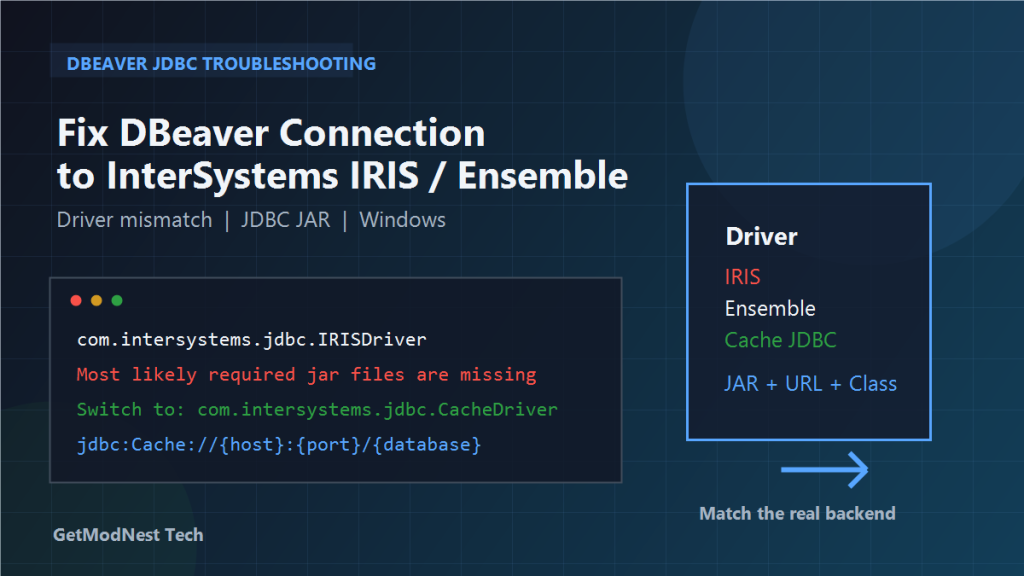
com.intersystems.jdbc.IRISDriver, can't create instance (com.intersystems.jdbc.IRISDriver)
Error creating driver InterSystems IRIS instance.
Most likely required jar files are missing.
At first glance, this looked like a missing JDBC driver package problem.
However, after further troubleshooting, the core issue turned out not to be a simple missing JAR file. The main problem was that the target server was actually an Ensemble / Cache-side service, while DBeaver had been configured with the InterSystems IRIS driver definition.
Step 1: Check the JDBC Driver Package
The first step was to verify whether the JDBC JAR file actually existed.
The package checked during the process was in the form:
intersystems-jdbc-*.jarIn DBeaver, the driver settings were reviewed through the driver management interface.
The following items were checked:
- whether the driver library JAR had been added
- whether the driver class name was correct
- whether the JDBC URL template matched the actual database type
The initial configuration being tested included items like:
- driver class:
com.intersystems.jdbc.IRISDriver - URL template:
jdbc:cache://{host}:{port}/{database}
Even after adding the JAR file, the connection test still failed.
This indicated that the problem was not only about whether the driver file existed.
Step 2: Check the Database Service and Installation Status
The next step was to verify whether the InterSystems service was actually installed and running normally.
The following checks were made:
- whether the InterSystems IRIS or Ensemble-related service existed in the system service list
- whether the executable files under the installation directory were present and normal
- whether the environment had an IRIS service or only an Ensemble / Cache-side runtime
An installation path similar to the following was checked:
C:\InterSystems\Ensemble\binThe investigation showed that the environment was centered on InterSystems Ensemble rather than a standalone IRIS deployment.
That became a key clue.
Step 3: Determine That the Wrong Driver Type Had Been Selected
A key conclusion from the troubleshooting process was this:
DBeaver had been configured with the InterSystems IRIS driver, but the actual backend service being accessed was more consistent with Ensemble / Cache.
In other words:
- the target service side was not a pure IRIS JDBC endpoint
- the selected driver definition in DBeaver did not match the actual server product line
- the driver class and URL pattern therefore did not align with the service being accessed
This is why DBeaver kept trying to initialize com.intersystems.jdbc.IRISDriver, but the connection setup did not work correctly in the real environment.
Step 4: Reconfigure the Driver as an Ensemble / Cache-Compatible JDBC Driver
The solution was to stop using the IRIS driver definition and instead create or switch to an Ensemble / Cache-compatible JDBC configuration.
A Cache-style JDBC template was then used.
The adjusted configuration included items like:
- driver name:
InterSystems Ensemble (Cache JDBC) - driver class:
com.intersystems.jdbc.CacheDriver - JDBC URL template:
jdbc:Cache://{host}:{port}/{database} - JAR file:
intersystems-jdbc-*.jar
or a specific local driver package such as:
C:\InterSystems\Ensemble\dev\java\lib\JDK18\cachejdbc.jarAfter switching to a Cache / Ensemble-compatible driver definition, the configuration became much closer to the actual server environment.
Step 5: Load the Ensemble / Cache JDBC Driver Manually If Needed
If the built-in driver definition in DBeaver is incomplete or does not load correctly, the driver can be configured manually.
A practical process is:
- Open DBeaver driver management.
- Create a new driver or edit the existing InterSystems-related driver.
- Set the driver class to:
com.intersystems.jdbc.CacheDriver - Add the local JAR file manually, for example:
C:\InterSystems\Ensemble\dev\java\lib\JDK18\cachejdbc.jar - Confirm that the JAR file appears in the driver libraries list.
- Save the driver configuration and test again.
This step is especially useful when DBeaver cannot automatically locate the correct InterSystems JDBC driver package.
Step 6: Test the Connection Again
After correcting the driver type and loading the proper JAR package, the connection was tested again.
During testing, one attempt to connect to the remote host resulted in a timeout, for example when using:
192.168.140.4This suggested that, besides driver mismatch, network reachability also needed to be checked.
At another stage, a local host based attempt was also mentioned, along with database user / namespace information.
This indicates that connection success can depend on multiple dimensions at the same time:
- correct JDBC driver type
- correct JAR file
- reachable host and port
- correct namespace or database name
- valid user credentials
Step 7: Confirm the Successful Driver and Server Identification
After the adjustment, the service and driver details shown in the environment reflected a Cache / Ensemble-side setup rather than a pure IRIS-side driver pairing.
The final working direction can be summarized as:
Cache -> Ensemble -> IRISThis means that even if the broader product family contains IRIS-related components, the actual JDBC access path in this environment was better matched by the Cache / Ensemble-compatible driver.
Root Cause Analysis
- DBeaver was initially configured with the InterSystems IRIS driver.
- The target environment was actually closer to an Ensemble / Cache JDBC environment.
- The driver class
com.intersystems.jdbc.IRISDriverdid not match the real service-side interface being used. - The error message about missing JAR files was partly misleading because the deeper issue was driver mismatch rather than only file absence.
- In some tests, there were also host connectivity or timeout factors that could affect connection validation.
Recommended Driver Settings
For environments that are actually based on Ensemble / Cache compatibility, the following settings are more appropriate than the IRIS driver definition.
Driver name:
InterSystems Ensemble (Cache JDBC)Driver class:
com.intersystems.jdbc.CacheDriverJDBC URL format:
jdbc:Cache://{host}:{port}/{database}Driver library example:
C:\InterSystems\Ensemble\dev\java\lib\JDK18\cachejdbc.jarTroubleshooting Checklist
- Is the selected driver really appropriate for the target product line?
- Is the target server truly IRIS, or is it actually Ensemble / Cache compatible?
- Has the correct JAR file been added to the driver libraries list?
- Is the driver class set to
com.intersystems.jdbc.IRISDriverorcom.intersystems.jdbc.CacheDriver, and which one actually matches the environment? - Does the JDBC URL template match the selected driver?
- Is the remote host reachable?
- Is the port open?
- Is the namespace or database name correct?
- Are the username and password valid?
- Is DBeaver caching an old driver definition that should be replaced or recreated?
Summary
The key lesson from this troubleshooting case is that a JDBC initialization error in DBeaver does not always mean that the required JAR file is truly missing.
In this case, the more important issue was that the wrong InterSystems driver type had been selected.
The effective recovery path was:
- verify the JDBC JAR package
- check the actual InterSystems product and service type
- determine whether the backend is IRIS or Ensemble / Cache compatible
- switch from
com.intersystems.jdbc.IRISDrivertocom.intersystems.jdbc.CacheDriverwhen appropriate - re-add the correct JAR package
- test host, port, namespace, and credentials again
Once the driver definition matched the actual service environment, the DBeaver connection could be established normally.
Need Help with a Similar Problem or Project?
This note is based on a real troubleshooting, configuration, or development workflow. If you need help with databases, Linux servers, web applications, desktop software, iOS and Android apps, automation scripts, deployment, or AI development environments, GetModNest can provide practical technical support, troubleshooting, and development assistance.
Email: info@getmodnest.com