Overview
This article documents a troubleshooting case for Oracle listener connection errors on Windows Server 2008 R2.
The environment involved Oracle 9i, PL/SQL Developer, and a BSEAP 5.0 client. The database instance itself could be started, and the listener process could also run, but client tools could not connect correctly.
The most important client-side errors were:
SQL*Plus / SQL*Net: ORA-0005: archiver error. Connect internal only, until freed.and:
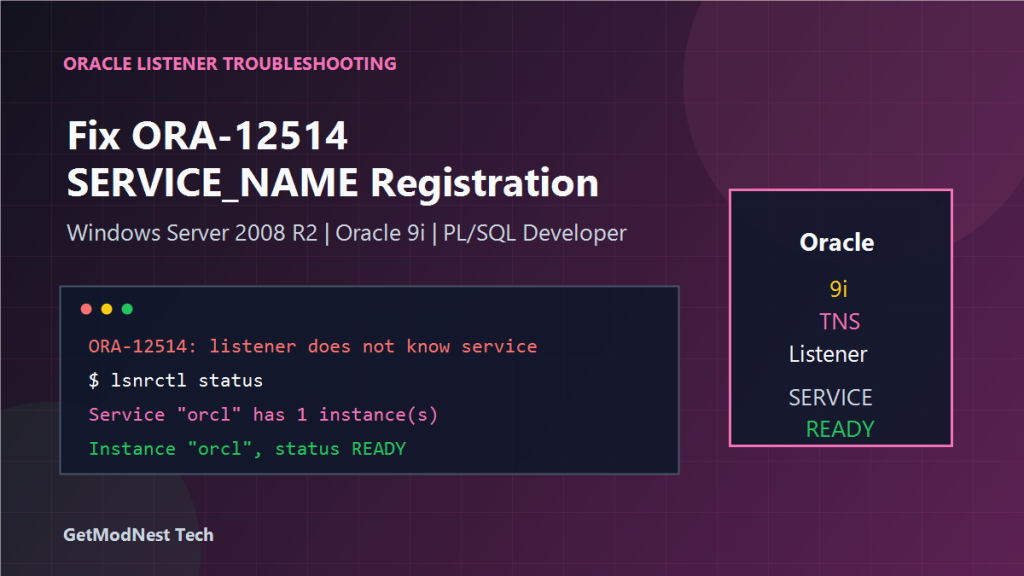
ORA-12514: TNS listener does not currently know of service requested in connect descriptorThe final root cause was that the Oracle database instance was not correctly registered with the listener. The connection descriptor used by PL/SQL Developer or the business client referenced a SERVICE_NAME that the listener did not know.
Environment
- OS: Windows Server 2008 R2
- Database: Oracle 9i Standard Edition
- Client tools: PL/SQL Developer and BSEAP 5.0 client
- Service management: Windows Services and command line
- Listener service name:
OracleTNSListener - Database instance service format:
OracleService<SID>
Problem Description
The business client reported a database connection failure.
PL/SQL Developer also failed to connect and returned:
ORA-12514: TNS listener does not currently know of service requested in connect descriptorThis error means that the listener was reachable, but it did not have a registered service matching the SERVICE_NAME in the client connection string.
Key Diagnosis
The key point was to separate these three layers:
- whether the Oracle instance service is running
- whether the Oracle listener service is running
- whether the listener knows the correct database
SERVICE_NAME
A running listener does not automatically mean the database service is correctly registered.
Step 1: Check Listener Status
Run the following command:
lsnrctl statusThe observed result was similar to:
Service "orcl" has 1 instance(s).
Instance "orcl", status READY
This indicates that the listener already knows a service named orcl, and the instance status is READY.
If the service list is empty, or if the expected service is not listed, the client may fail with ORA-12514.
Step 2: Check Windows Oracle Services
Important services include:
OracleService<SID>
Oracle...TNSListener
The database instance service and the listener service should both be running.
If the database instance service is stopped, start it:
net start OracleServiceXXXIf needed, restart it:
net stop OracleServiceXXX
net start OracleServiceXXX
Replace XXX with the actual SID.
Step 3: Restart the Listener
Restart the Oracle listener:
net stop OracleTNSListener
net start OracleTNSListener
After restarting, check again:
lsnrctl statusAt this point, the listener should show the correct service and instance status.
Step 4: Verify SERVICE_NAME in Client Configuration
The ORA-12514 error is commonly caused by a mismatch between the client connection descriptor and the listener service list.
If lsnrctl status shows:
Service "orcl" has 1 instance(s)
Instance "orcl", status READY
then the client should also use:
SERVICE_NAME=orclIf the client uses another service name, the listener will reject it with ORA-12514.
Step 5: Check tnsnames.ora
The tnsnames.ora entry should match the service shown by lsnrctl status.
ORCL =
  (DESCRIPTION =
    (ADDRESS = (PROTOCOL = TCP)(HOST = server_ip_or_hostname)(PORT = 1521))
    (CONNECT_DATA =
      (SERVICE_NAME = orcl)
    )
  )
For older Oracle environments, some clients may use SID instead of SERVICE_NAME:
(CONNECT_DATA =
  (SID = orcl)
)
The correct choice depends on how the listener and database are configured.
Step 6: Test PL/SQL Developer Again
After verifying the listener and client connection descriptor, test PL/SQL Developer again.
If PL/SQL Developer previously returned ORA-12514, then a corrected SERVICE_NAME or SID entry should allow it to connect.
Step 7: Test the BSEAP 5.0 Client
After PL/SQL Developer succeeds, test the business client again.
If the BSEAP client still fails, verify whether its database connection configuration uses the same host, port, and service name as the working PL/SQL Developer connection.
About the Archiver Error
One note also mentioned an error similar to:
archiver error. Connect internal only, until freed.This type of error usually means the database archiver process is blocked, often because archive log space is full or the archive destination is unavailable.
If this error appears, check the archive log destination, free disk space, database alert log, and whether archived redo logs need to be moved or backed up.
However, in this troubleshooting case, the main connection problem was related to listener service registration and SERVICE_NAME configuration.
Root Cause Analysis
The issue was caused by a mismatch between the Oracle listener registration and the client connection configuration.
The important evidence was:
- PL/SQL Developer returned
ORA-12514. lsnrctl statuswas required to confirm what services the listener actually knew.- After checking and restarting the instance/listener services, the listener showed
Service "orcl"andInstance "orcl", status READY. - The client configuration needed to match that service name.
Recommended Troubleshooting Sequence
1. Check Whether the Database Service Is Running
net start OracleServiceXXX2. Check Whether the Listener Is Running
lsnrctl status3. Restart the Database Instance Service If Needed
net stop OracleServiceXXX
net start OracleServiceXXX
4. Restart the Listener
net stop OracleTNSListener
net start OracleTNSListener
5. Confirm Listener Registration
lsnrctl statusExpected result:
Service "orcl" has 1 instance(s).
Instance "orcl", status READY
6. Match SERVICE_NAME in the Client
Make sure PL/SQL Developer, tnsnames.ora, and the business client use the service name shown by lsnrctl status.
SERVICE_NAME=orclCommon Mistakes
- Assuming the listener is correct just because the listener service is running.
- Using a
SERVICE_NAMEin the client that does not appear inlsnrctl status. - Restarting only the listener but not the database instance service.
- Restarting only the database instance but not the listener.
- Confusing
SIDandSERVICE_NAMEin older Oracle versions. - Ignoring archive log errors that may block normal database access.
Final Conclusion
The Oracle connection failure was mainly caused by the listener not recognizing the service requested by the client.
The key diagnostic command was:
lsnrctl statusThe listener needed to show a registered service such as:
Service "orcl" has 1 instance(s).
Instance "orcl", status READY
After restarting the Oracle instance service and the listener, and after ensuring that the client used the correct SERVICE_NAME, PL/SQL Developer and the business client could be tested again.
The most important lesson is that a running Oracle listener does not guarantee that the requested database service is registered.
Always compare the client SERVICE_NAME with the services shown by lsnrctl status.
Need Help with a Similar Problem or Project?
This note is based on a real troubleshooting, configuration, or development workflow. If you need help with databases, Linux servers, web applications, desktop software, iOS and Android apps, automation scripts, deployment, or AI development environments, GetModNest can provide practical technical support, troubleshooting, and development assistance.
Email: info@getmodnest.com